

Quick Answer
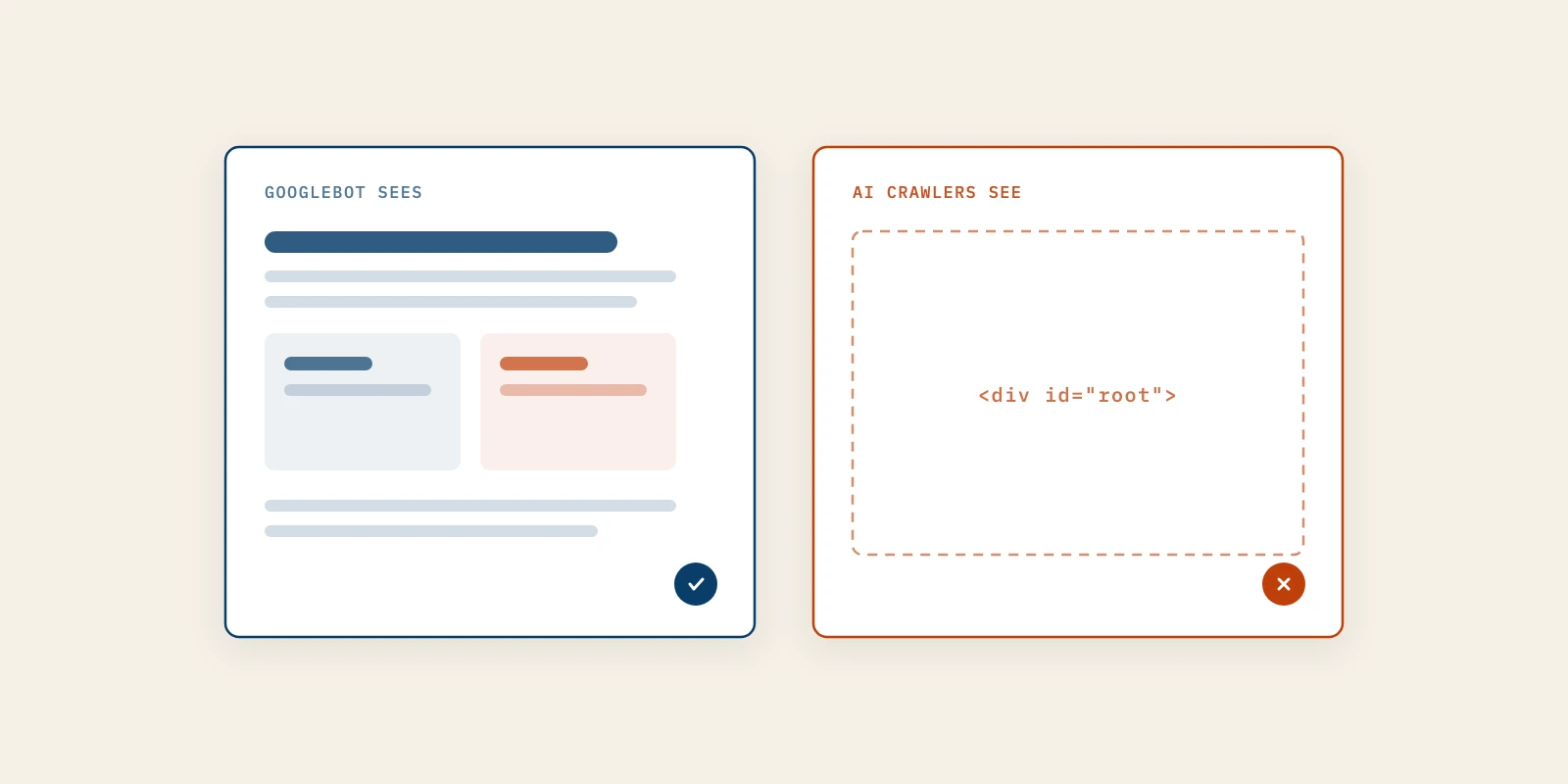
Googlebot renders JavaScript before it indexes a page, so a site built on client-side rendering can still rank on Google. The crawlers behind ChatGPT, Claude and Perplexity were measured fetching raw HTML without running scripts, so the same pages can reach them nearly empty. Test by searching your server's raw HTML for your headline and pricing, then move those sentences into prerendered or server-rendered HTML.
A founder who built the marketing site as a React single-page app usually checks it the obvious way. The page loads, the copy is there, and Google shows it in results.
That check runs your JavaScript, and so does Googlebot. The crawlers that feed answer engines have been measured doing something simpler, which means the page you see and the page they read can be two different documents.
The gap is quiet, because nothing breaks and no report flags it. This post covers how each kind of crawler reads a page, a five-minute test, and the fixes ordered from an afternoon's work to a rebuild.
How Googlebot Crawls, Renders and Indexes a React Site
Googlebot handles client-side rendering by running the page in a browser before indexing it. Google's JavaScript SEO basics describes three phases, crawling, rendering and indexing, and says Google Search "runs JavaScript with an evergreen version of Chromium".
Rendering is queued, not instant. Google's own wording is that a page "may stay on this queue for a few seconds, but it can take longer than that", and only then does a headless Chromium execute the JavaScript and hand the rendered HTML to indexing.
So a React site with client-side rendering is readable to Google, with two caveats. Links that appear only after rendering wait for that queue before Google can follow them, and a page that returns a non-200 status may skip rendering entirely.
Rendering support is also not a guarantee of full indexing. In an April 2026 write-up on dev.to, a developer found Google had indexed only the homepage of a 35-page single-page app, and a build step that wrote one HTML file per route fixed it.
Why AI Crawlers Read Only the HTML Your Server Sends
The crawlers behind answer engines were measured fetching HTML without executing it, which leaves client-side rendering invisible to them. Vercel and MERJ published The rise of the AI crawler in December 2024. It states that "none of the major AI crawlers currently render JavaScript."
The list covered GPTBot, OAI-SearchBot and ChatGPT-User from OpenAI, ClaudeBot from Anthropic, Meta-ExternalAgent, Bytespider and PerplexityBot. Vercel also found ChatGPT and Claude crawlers downloading JavaScript files, 11.50 percent and 23.84 percent of their requests, without executing them.
Two exceptions matter. Vercel reported that Gemini uses Googlebot's infrastructure and renders fully, and that AppleBot renders through a browser-based crawler.
The vendors' own documentation does not settle it either way. OpenAI's crawler overview describes what GPTBot, OAI-SearchBot and ChatGPT-User are for, and Anthropic and Perplexity describe ClaudeBot and PerplexityBot the same way, but none of the three pages says if the crawler runs JavaScript.
The volume is not trivial. In the month before publication Vercel counted 569 million GPTBot requests and 370 million from Claude across its network, against 4.5 billion from Googlebot, which Vercel put at about 20 percent of Googlebot's volume.
Googlebot Compared With GPTBot, ClaudeBot and PerplexityBot
The difference comes down to one column: whether the crawler executes your scripts before it reads the page. Only one of these crawlers is documented as doing so.
| Crawler | What It Is For | Runs JavaScript | Evidence |
|---|---|---|---|
| Googlebot | Google Search indexing | Yes, evergreen Chromium | Google's own docs |
| GPTBot | OpenAI model training | No | Vercel and MERJ, 2024 |
| OAI-SearchBot | Results in ChatGPT search | No | Vercel and MERJ, 2024 |
| ClaudeBot | Anthropic model training | No | Vercel and MERJ, 2024 |
| PerplexityBot | Results in Perplexity | No | Vercel and MERJ, 2024 |
Read the last column before you plan around the third. Google documents its rendering, while the AI rows rest on one measurement from 2024 that the vendors have neither confirmed nor contradicted, so treat client-side rendering as a risk for them rather than a proven block.
How to Make a React Site Readable Without Running JavaScript
Make the sentences that matter present in the HTML your server sends, then confirm AI crawlers can reach that HTML. The five steps below run from a five-minute test to a rebuild, and most marketing sites are finished by the third.
Google gives the reason in one sentence: "Keep in mind that server-side or pre-rendering is still a great idea because it makes your website faster for users and crawlers, and not all bots can run JavaScript."
1. Run the Raw HTML Test on Five Sentences
The test shows what a crawler that skips JavaScript receives. Pick five sentences you would want an answer engine to quote: the headline, the pricing line, one testimonial, one feature claim and one comparison line.
From a terminal, run curl -s https://yourdomain.com/pricing and search the output for each sentence. In a browser, use View Source rather than the inspector, because the inspector shows the page after client-side rendering has run.
On a Vite or Create React App site with no prerendering, the source usually holds a div with an id of root and a script tag. That is the whole page as GPTBot is likely to see it, and it is why on-page SEO work on such a page reaches Google and stops there.
The test passes when all five sentences appear in the raw response. The mistake is testing only the homepage, since pricing and comparison pages are the ones an assistant needs to answer a buying question.
2. Put the Proof Sentences in the Initial HTML
If a rebuild is months away, move the few sentences that carry your claims into markup the server already sends. That can be the static shell in index.html, a server template or a no-code builder's static text block.
Keep the interactive version for people if you need it. The static sentence is the one crawlers read, and the script-driven one is enhancement.
A pricing table fetched from an API after load is the common example. Writing the plan names and prices into the page as plain HTML takes an afternoon and closes the biggest gap.
It worked when the raw HTML test from step one passes on those pages. The mistake is letting the two versions drift, so the static price and the rendered price disagree the week after a pricing change.
3. Prerender the Marketing Routes at Build Time
Static rendering produces a finished HTML file for each marketing URL during the build and leaves the product app alone. The web.dev guide Rendering on the Web defines it as "Running a client-side application at build time to capture its initial state as static HTML."
This is how btrgrowth.com works. It is a React and Vite site built with vite-react-ssg, so every page, blog post and FAQ answer ships as static HTML that a crawler can read without running a script.
We learned one cost of that setup the hard way. A change to a post in the database reaches human readers on their next visit, but crawlers see nothing new until the site is rebuilt and the HTML files are regenerated.
It worked when the raw HTML test passes on every marketing route and the build output holds one file per URL. The mistake is prerendering only the homepage.
Blog posts and comparison pages left to client-side rendering stay invisible to the same crawlers. Better Marketing's AI SEO service starts with this check for that reason, because structure and schema on a page crawlers cannot read are wasted.
4. Move to Server-Side Rendering When Pages Change Constantly
Server-side rendering builds the HTML on each request, which suits large page sets and content that changes daily. It costs more to run and maintain than static files, so use it when prerendering cannot keep up rather than by default.
Google has been explicit about the older shortcut. Its page on dynamic rendering calls serving bots a separate rendered copy "a workaround and not a long-term solution" and recommends server-side rendering, static rendering or hydration instead.
A marketplace with thousands of listings updated hourly is the case for it. A marketing site of forty pages that changes weekly almost never is.
It worked when every route returns complete HTML on the first response with no build step between an edit and a crawler. The mistake is a framework migration for a site that step three would have fixed in a day.
5. Confirm AI Crawlers Can Reach the Rendered Pages
Readable HTML does nothing if the request is blocked first. Check three layers: robots.txt, your CDN or firewall bot settings, and your server logs.
In robots.txt, confirm GPTBot, OAI-SearchBot, ClaudeBot and PerplexityBot are not disallowed on the pages you want quoted. Then check your CDN, since bot-management toggles can refuse AI crawlers even when robots.txt welcomes them, a failure a May 2026 dev.to post described as silent.
Finally, search your access logs for those user agents and confirm they received a 200 status on the pages you fixed. If they never appear, the pages may simply not have been fetched yet.
It worked when the logs show AI user agents fetching fixed pages successfully. The mistake is stopping at robots.txt and assuming the rest of the stack agrees.
What Disappears From Raw HTML on a Typical Marketing Site
With client-side rendering, the headline often survives in the shell while the proof beneath it disappears. These are the elements that most often exist only after JavaScript runs:
- Pricing tables loaded from a billing or CMS API.
- Testimonials and logo walls pulled from a CMS.
- Content inside tabs or accordions that is rendered only when opened.
- Copy swapped in by an A/B testing script.
- FAQ answers mounted conditionally instead of hidden with CSS.
The fourth and fifth are easy to fix without a rebuild. Hide closed accordion panels with CSS rather than removing them from the page, which is how this site keeps every FAQ answer in its static HTML.
When Client-Side Rendering Is Still the Right Choice
Client-side rendering is the right choice for anything behind a login. Dashboards, settings pages and the product itself should never be quoted by an assistant, so there is nothing to gain from rendering them on a server.
It is also fine for a marketing page you do not want cited, such as a gated demo or a campaign page with a short life. Spend the rendering effort on pricing, comparisons and the pages that answer buying questions. That is also where a B2B demand generation agency sends outbound prospects, who increasingly check a vendor with an assistant before they reply.
Client-side rendering is also not the first problem on every site. If no page yet says anything worth quoting, content marketing for tech companies comes before rendering work, and being quotable is a separate job from being readable.
One objection deserves a straight answer. A common reply on Hacker News is that modern scrapers all run headless browsers, which is true of plenty of scrapers but not of the named AI crawlers in the only published measurement. The evidence is from 2024, so re-run the raw HTML test and check your logs twice a year instead of trusting any article, this one included.
What to Check on Your Site This Week
Run the raw HTML test on your homepage, pricing page and one comparison page, then read robots.txt and your CDN bot settings. If sentences are missing, prerender the marketing routes before you plan a rebuild or pay a B2B demand generation agency to send traffic there.
That fix comes before any AI SEO service or content marketing for tech companies, because an answer engine cannot quote a page it never read. Better Marketing checks for client-side rendering on public pages first, for exactly that reason.